
Medusa gives you a product reviews skeleton. We built what a real store needs on top.
The official Medusa tutorial ends at a form, a status and an approve button. A store also needs proof of purchase, a way to collect reviews, moderation with rules and legal compliance. Here is what we added and how it works.
Short answer
Medusa has no product reviews out of the box. The official tutorial shows how to build a basic module: a review model, a status, approval in the admin and a list on the product page. A store that wants to rely on reviews needs four more things: proof of purchase, a way to collect reviews, moderation with clear rules and legal compliance. We built them as a custom Medusa module.
What does Medusa provide for product reviews?
Medusa does not provide product reviews out of the box. The documentation says so directly and offers an official tutorial that builds a custom module step by step: a review model with a rating from 1 to 5, a title, content and a status (pending, approved, rejected), a link to the product, a form for logged-in customers, a list of approved reviews with an average, and an admin page where reviews can be approved or rejected.
It is a good starting point and a good example of how Medusa is extended. It does not answer the questions that come up on the day the store goes live.
| Area | Medusa tutorial | What we added |
|---|---|---|
| Who can review | Any logged-in customer | Only a customer who bought the product, with or without an account |
| Where reviews come from | A form on the product page | An account tab and one email a week after the order |
| Editing | None | The customer can change a review, the change goes back to moderation |
| Moderation | Approve or reject | Rejection with a reason, store reply, change history, statistics |
| Emails | None | Request, published, store replied, rejected |
| Product page | Average and list | Star breakdown, filter, “How we check reviews”, “Report” |
| None | Structured data and a Merchant Center feed | |
| Law | None | Omnibus, DSA and GDPR built into the design |
How do you know a review was written by someone who bought the product?
The backend decides whether a review counts as a verified purchase review. Before the module saves a review, it checks that the product is in an order placed by that person. Hiding the “Rate” button in the interface is not protection, because anyone can send a request to the API.
A review can be submitted only once the order has the status “delivered”. Before that the customer has not had the product in hand, so there is nothing to rate. A later return does not remove the review: the purchase happened and the customer got to know the product. One product from one order can be rated once, and later changes are edits of the same review.
This is what gives the “Verified purchase” label on the product page something to stand on, and in the admin every review shows the order number it comes from.
A guest customer can leave a verified purchase review too. The link in the review request email carries a token tied to the order and has an expiry date, stated in the message. The token cannot be used to rate products from a different order.
How do you collect customer reviews without flooding people with email?
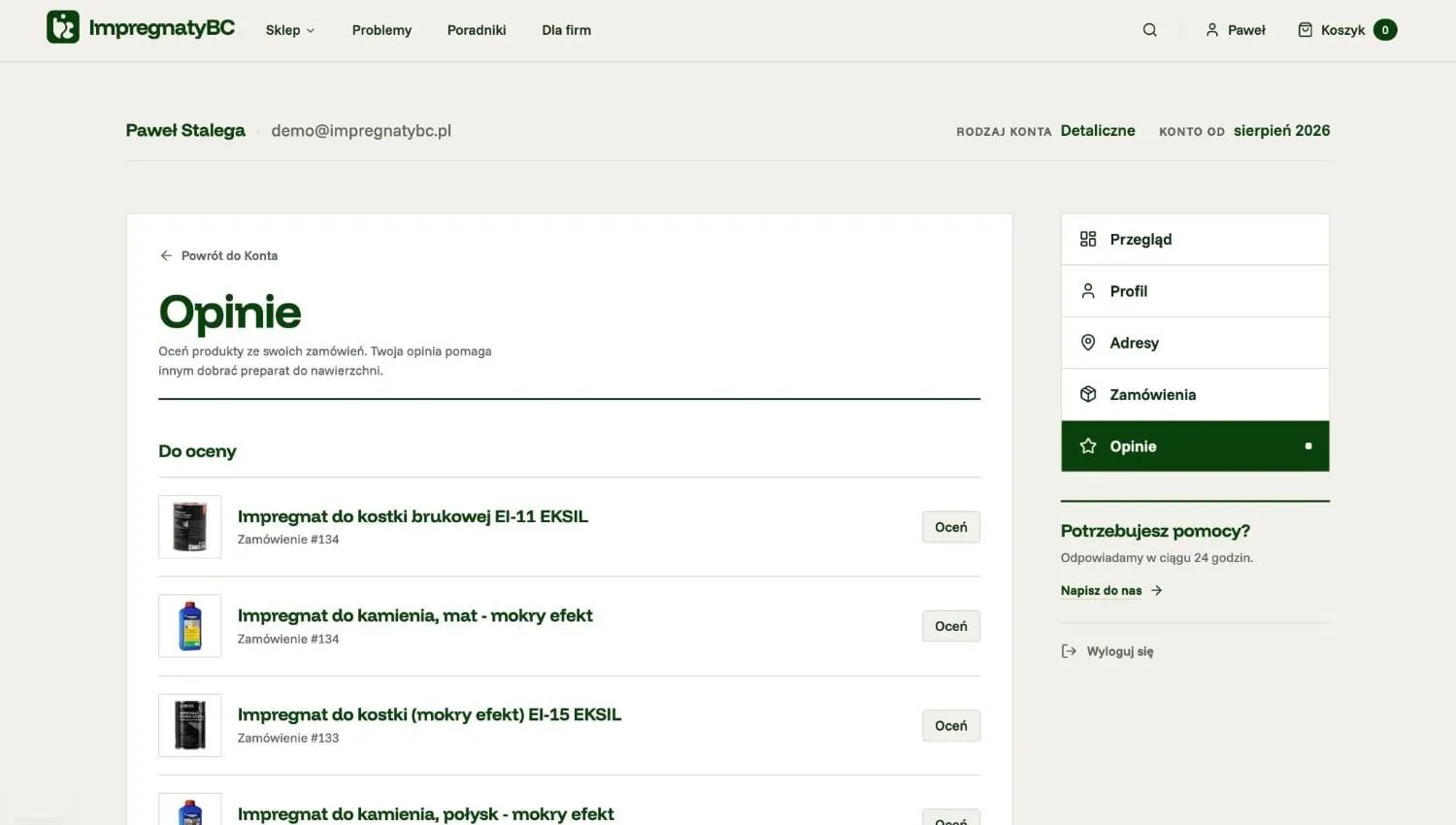
Reviews come from two places: the customer account and one email. In the account, the “Reviews” tab lists the purchased products that are waiting for a rating, and a banner on the account home page shows how many there are.
The review request email goes out once, a week after the order, and only to people who ticked the consent box at checkout. We do not send follow-up reminders for the same order. A customer can opt out with one click from the order confirmation email.
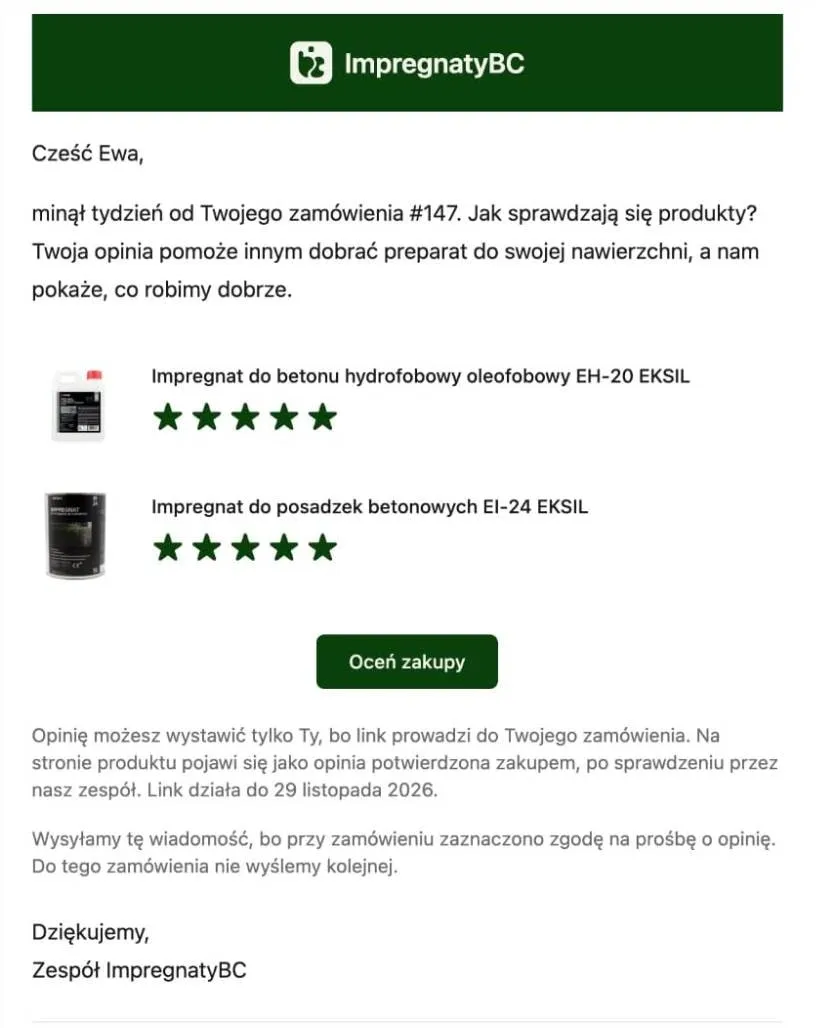
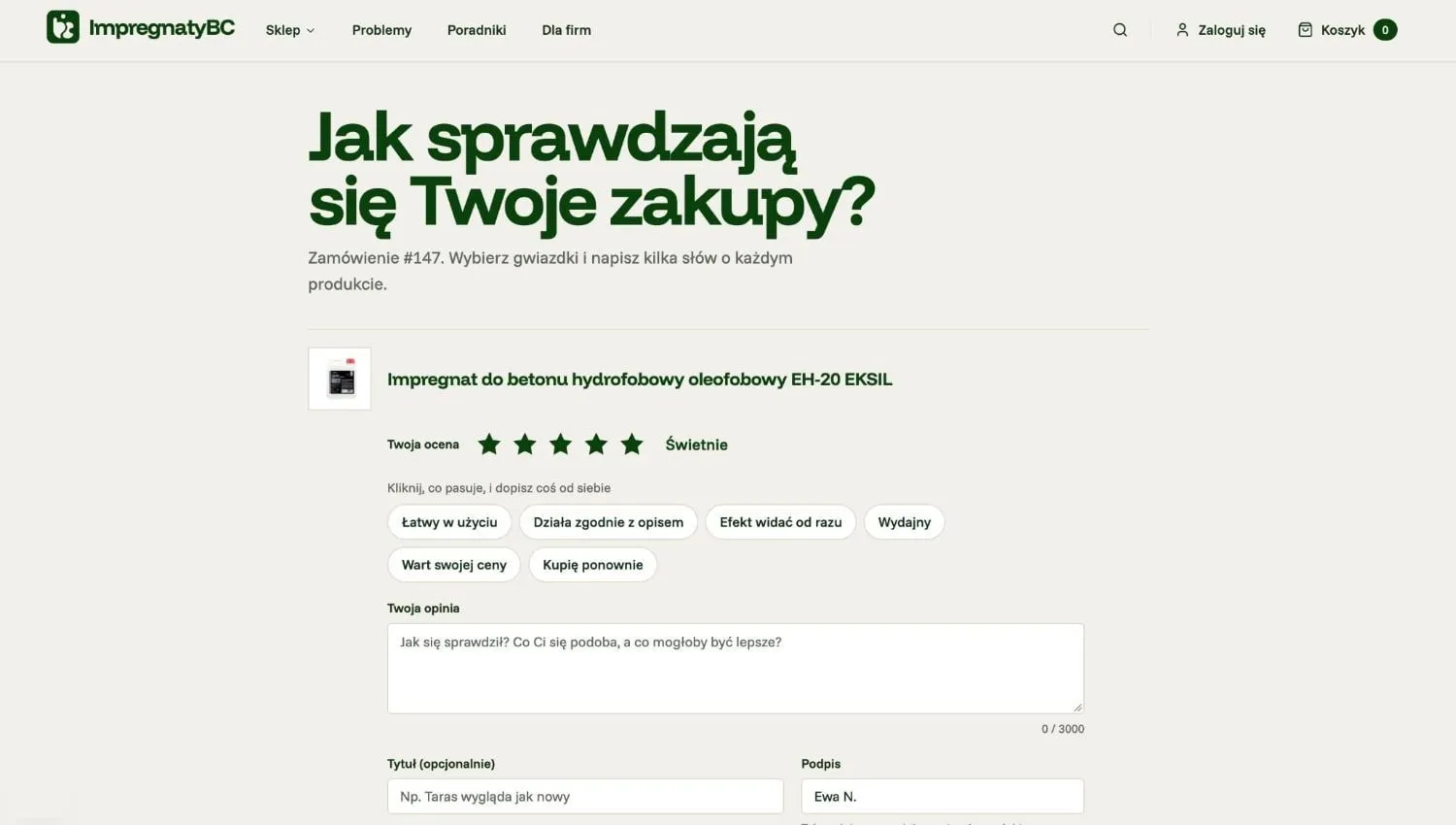
The stars in the email are clickable. A click opens the form with the rating already selected, so the customer starts halfway through. The form suggests ready-made phrases matched to the number of stars, which the customer can click and finish in their own words. The title is optional and the customer chooses how to sign the review.
A review can be changed later. In the account, the customer sees the status of each review and the store’s reply, if there is one.
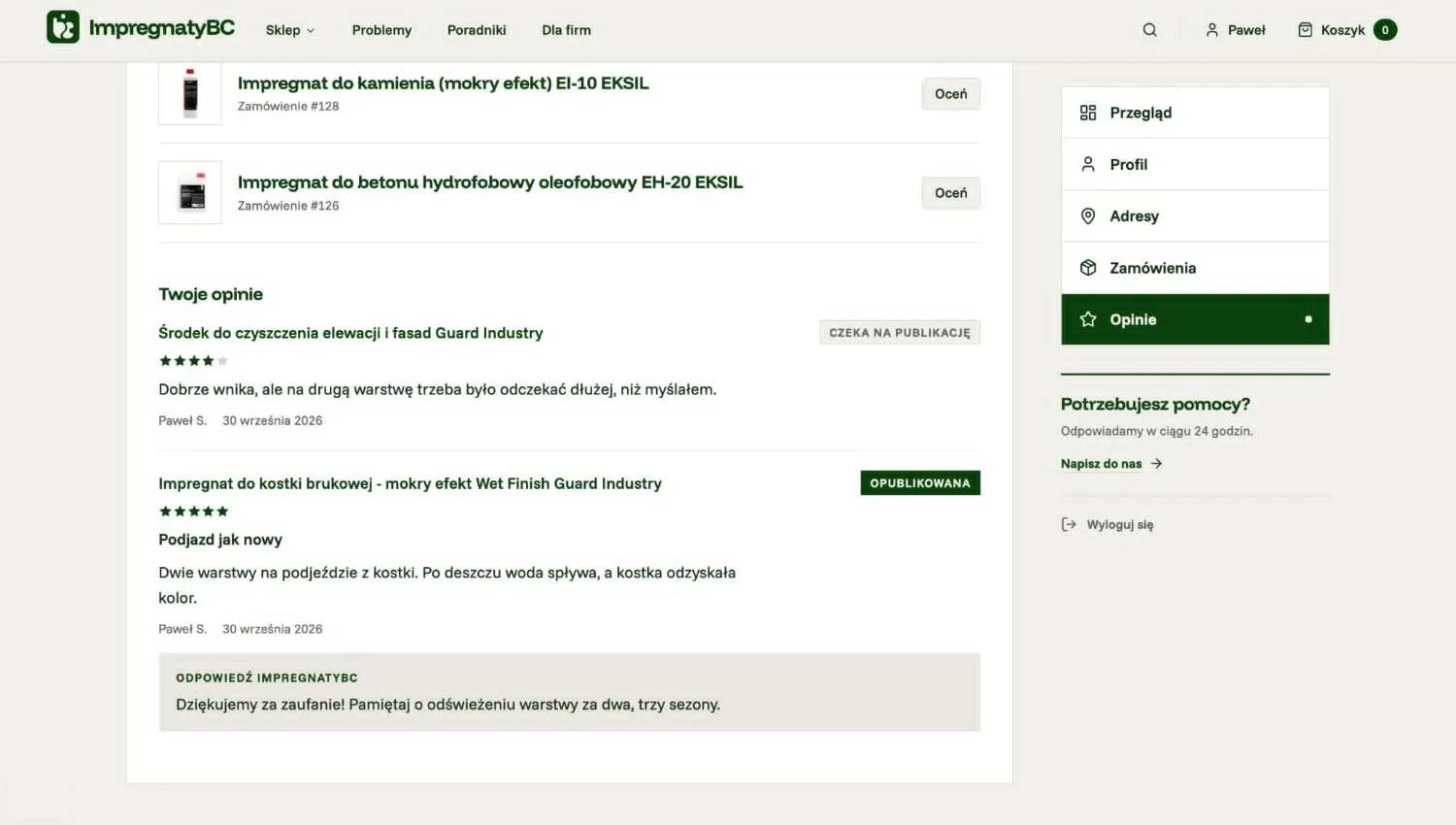
In total the customer can receive four kinds of message:
- A review request.
- A notice that the review was published.
- A notice that the store replied to the review.
- A notice that the review was rejected, with the reason and how to appeal.
What does review moderation look like in the Medusa admin?
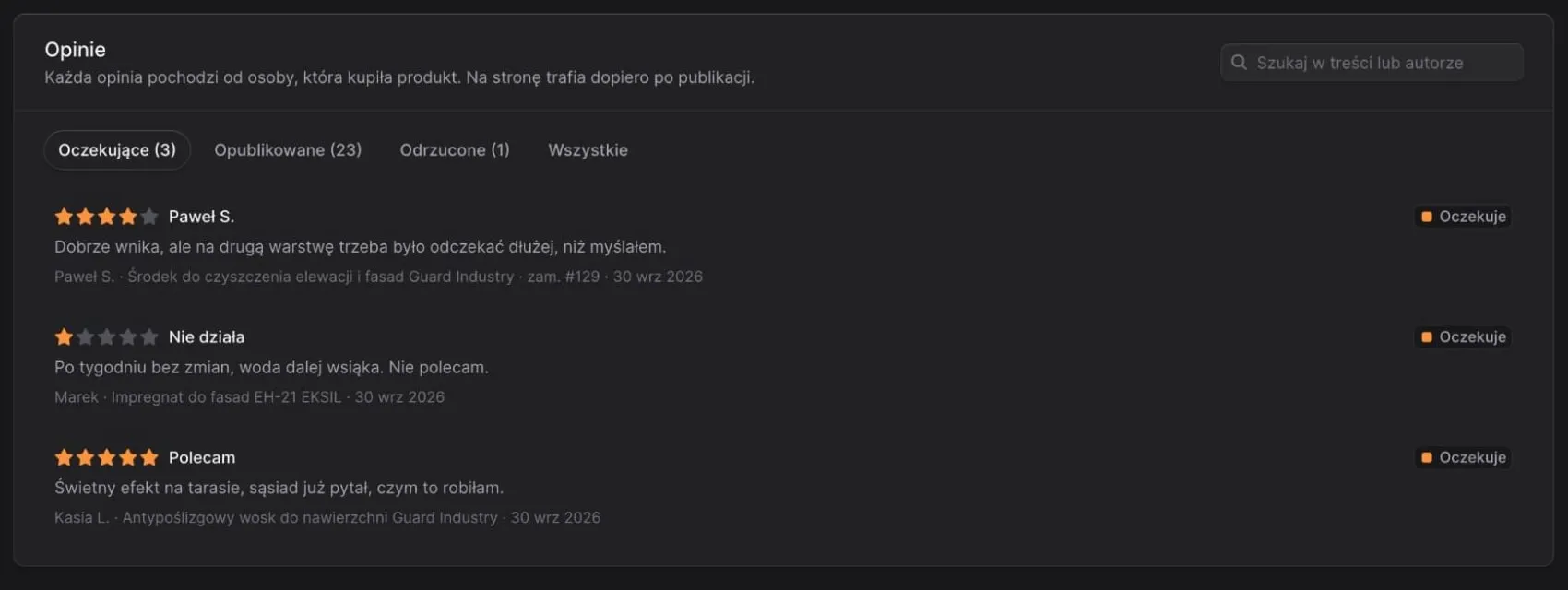
Every review waits for approval, including one the customer has edited. The administrator gets an email about each new review, and the Medusa admin has a separate “Reviews” page with queues for pending, published and rejected reviews and a search by content or author.
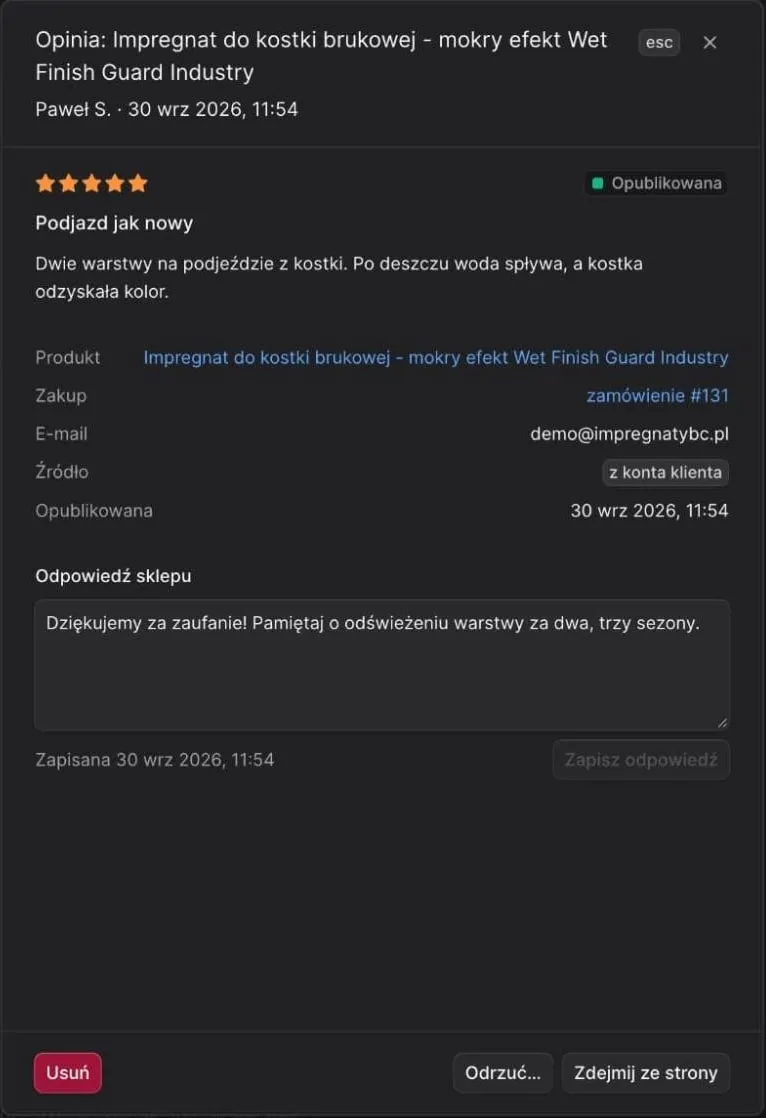
For each review the administrator has three decisions: publish it, reject it with a reason or reply publicly. A published review can also be taken off the page. The details show the product, the order and the source of the review (account or email), and the module keeps a change history for every review.
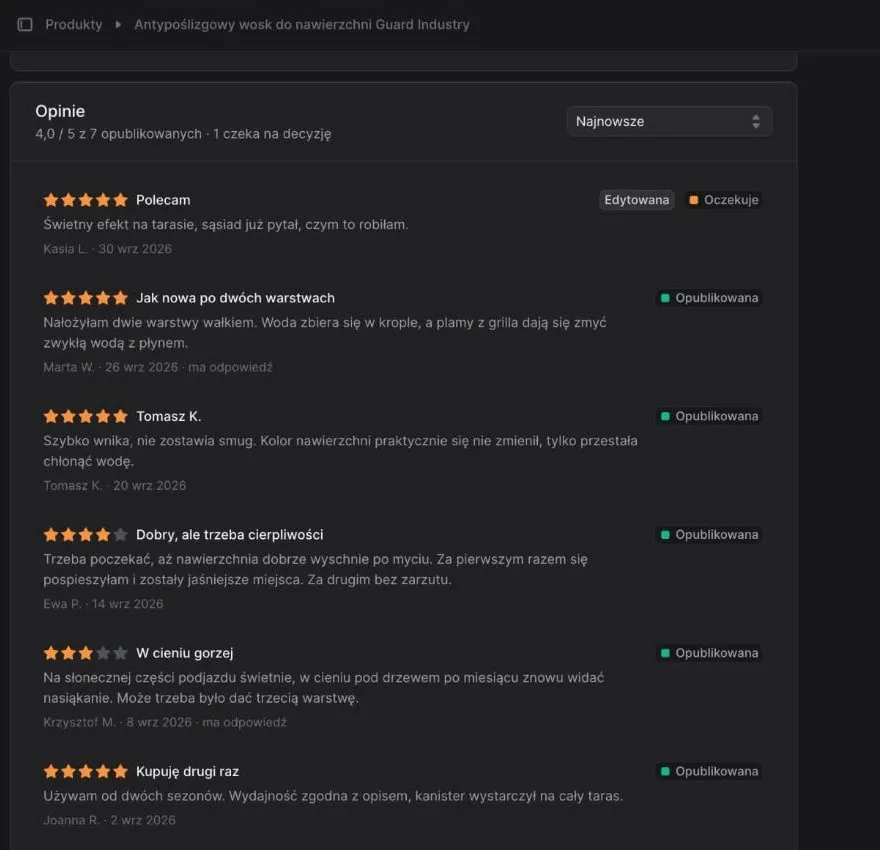
The same reviews appear on the product page in the admin, with the average, the number of reviews waiting for a decision and a mark on those the customer has edited. The admin also reports statistics: the average rating and the share of requests that customers answered.
Can a store delete a negative review?
A store should not remove a review because of a low rating. In our module a review can be rejected only for breaking the published rules, and a rejection needs a reason, which goes to the author together with information on how to appeal.
This rule is not a matter of style. The EU Omnibus Directive lists misrepresenting consumer reviews in order to promote products among unfair commercial practices. Publishing only positive reviews and deleting the negative ones is an example of that misrepresentation. Google, in turn, requires stores in its product ratings programme to share all reviews, including low-star ones (product ratings policies, as of October 2026).
A low rating is better answered in public. The store’s reply appears under the review, and the customer gets an email about it.
What does the shopper see on the product page?
The shopper sees the average rating, the star breakdown and the reviews, newest first. Reviews can be filtered by the number of stars, and more of them load gradually instead of the whole list at once. Stars and the average also appear on product cards in listings.
The average and the review count are calculated from published reviews only. A review that is waiting for approval or was rejected does not change the product’s rating, on the product page or in a listing.
Two elements come from regulation. The “How we check reviews” window explains that reviews come from buyers and go through moderation. The “Report” link next to each review lets anyone flag content that breaks the law or the rules.
How do product reviews reach Google?
There are two separate routes to Google. The first is structured data on the product page: an aggregate rating and individual reviews described in schema.org format. Google can then show stars in search results, as long as the marked-up reviews are visible to users on the same page (Google’s guidelines). Google does not guarantee that the stars will appear.
The second route is a review feed for Merchant Center, which puts ratings next to Shopping ads and product listings. The product ratings programme requires at least 50 reviews across all products and a feed updated at least once a month (programme requirements, as of October 2026). That is why we switch the feed on only after the store has collected 50 reviews.
What do Omnibus, the DSA and GDPR change about store reviews?
Regulation shapes a review module in three places: how reviews are verified, how they are moderated and how data is stored. These are the requirements we designed the module around.
| Regulation | What it requires | How the module answers |
|---|---|---|
| Omnibus | Information on whether and how the store checks that reviews come from buyers | Purchase checked in the backend, “How we check reviews” window |
| Omnibus | No misrepresentation of reviews | Rejection only for breaking the rules, always with a reason |
| DSA | A way to report illegal content | A “Report” link next to every review |
| DSA | A statement of reasons when content is removed, with information on redress | Rejection email with the reason and how to appeal |
| GDPR | A legal basis for sending the review request | Consent at checkout, one-click opt-out |
| GDPR | Storage limitation and the right to erasure | Author anonymised on request, rejected reviews and old versions deleted automatically after 3 years |
The store’s terms, privacy policy and data processing notice describe reviews the way the module works.
How is the module built in Medusa?
Reviews are a custom Medusa module with three tables: reviews, review requests and change history. A separate requests table makes it possible to count how many emails customers answered and ensures that one order gets one request. The change history keeps earlier versions of edited reviews.
Four technical decisions matter most:
- The backend checks the purchase. The “buyers only” rule is enforced when the review is saved, not in a storefront component.
- Email links are protected by a token. The token points to one order and expires, so the link from the email gives no access to the account or to other orders.
- Analytics receives no personal data. GA4 gets a
review_submittedevent, but tokens and email addresses never reach it. - The API has limits. One product from one order can be rated once and the number of requests is capped, so reviews cannot be submitted in bulk.
Refining the behaviour took a week of iteration: after each version we checked what happens to a published review after an edit, which email goes out when and what the customer sees at each status.
We extended the admin with a “Reviews” page and a section on the product page. Both use Medusa admin components, so the store’s staff do not have to learn a new tool. We build other features the same way in our Medusa development work: a custom module, data in the same database as the orders and an admin the team already knows.
When is a custom review module the wrong choice?
A custom review module is not worth building when a ready-made tool is enough. Four situations where that is the case:
- The store runs on a platform with a ready review app. On Shopify or WooCommerce, reviews come from an existing app or plugin and there is no reason to build your own.
- You want the recognisable badge of an external review service. Review services also work outside the store: they have company profiles, widgets and recognition of their own. A custom module does not give you that.
- There are few orders. With a dozen or so orders a month, moderation and review requests can be handled by hand.
- You want to bring reviews over from your old platform. We deliberately did not build an import. A review moved from another system does not pass the same purchase check, so it could not sit next to reviews labelled “Verified purchase” without a separate marking.
A custom module makes sense when the store runs on Medusa, reviews have to be tied to orders in the same database and customer data should not go to yet another vendor. It is the same decision we describe in custom vs off-the-shelf software: build only what a ready-made tool does not do well.
Reviews are one of many features a store needs beyond the cart and the payment. The review module is part of our Medusa foundation, so in the live e-commerce in 30 days offer we do not build it from scratch, we fit it to the store. The Alufix case study shows a complete purchase path we built on Medusa.js.
Frequently asked questions
Does Medusa have built-in product reviews?
No. The Medusa documentation states that product reviews are not provided out of the box and offers a tutorial that builds a basic module: a review model, a status, approval in the admin and a list on the product page. Purchase verification, review request emails, store replies, structured data and legal requirements have to be built separately or covered by an external tool.
Can a store delete a negative review?
Not for the low rating alone. Removing or hiding negative reviews misrepresents the product, and the EU Omnibus Directive treats that kind of misrepresentation as an unfair commercial practice. A store can reject a review that breaks its published rules, for example one that contains abuse, personal data or describes a different product. The author should then get the reason and a way to appeal.
When do review stars show up in Google?
In organic results Google can show stars when the product page carries valid rating structured data and the same reviews are visible on the page. Google does not guarantee that stars appear. In Shopping ads and Merchant Center listings, ratings need a separate review feed and at least 50 reviews across all of the store's products.
Can a guest customer leave a verified purchase review?
Yes, if the store sends a link tied to the order. In our module the link in the email carries a token that points to one order and expires. The customer rates the products from that order without logging in, and the backend knows the purchase happened. Without that link, reviews are submitted from the customer account.
Keep reading
Custom or off-the-shelf software? Calculate the cost of the whole operating model.
A practical custom versus off-the-shelf framework covering 24-month cost, process fit, integrations, risk and product advantage.


Questions after reading?
Tell us what the article leaves open for your company. We reply within one working day and prepare a hypothesis before any call.
A question about the article Something does not match your situation, or you want to check an assumption behind a number.
Your own problem Describe the sales process and where your current platform stops being enough.
The next step You are weighing custom, off-the-shelf or a migration and want a second opinion before you commit.