
Punchout catalog or B2B portal: when a supplier should build punchout
A large customer asks whether you support punchout, and the answer can win or lose the contract. Here is how a punchout catalog works, what it takes on the supplier side, how it differs from a B2B portal and which questions to ask before you build it.

Short answer
Build a punchout catalog when a named customer requires it, buys from you repeatedly and tells you which procurement system and protocol they use. Punchout lets that customer’s employees shop in your store from inside their own procurement software, at their contract prices, and send the cart back for approval. It is not a launch feature for all B2B customers: dealers and smaller buyers order directly in a B2B portal, and a buyer with a short, stable assortment may accept a static catalog file instead. Start with one customer, one protocol and the orders that already come from them.
What is a punchout catalog?
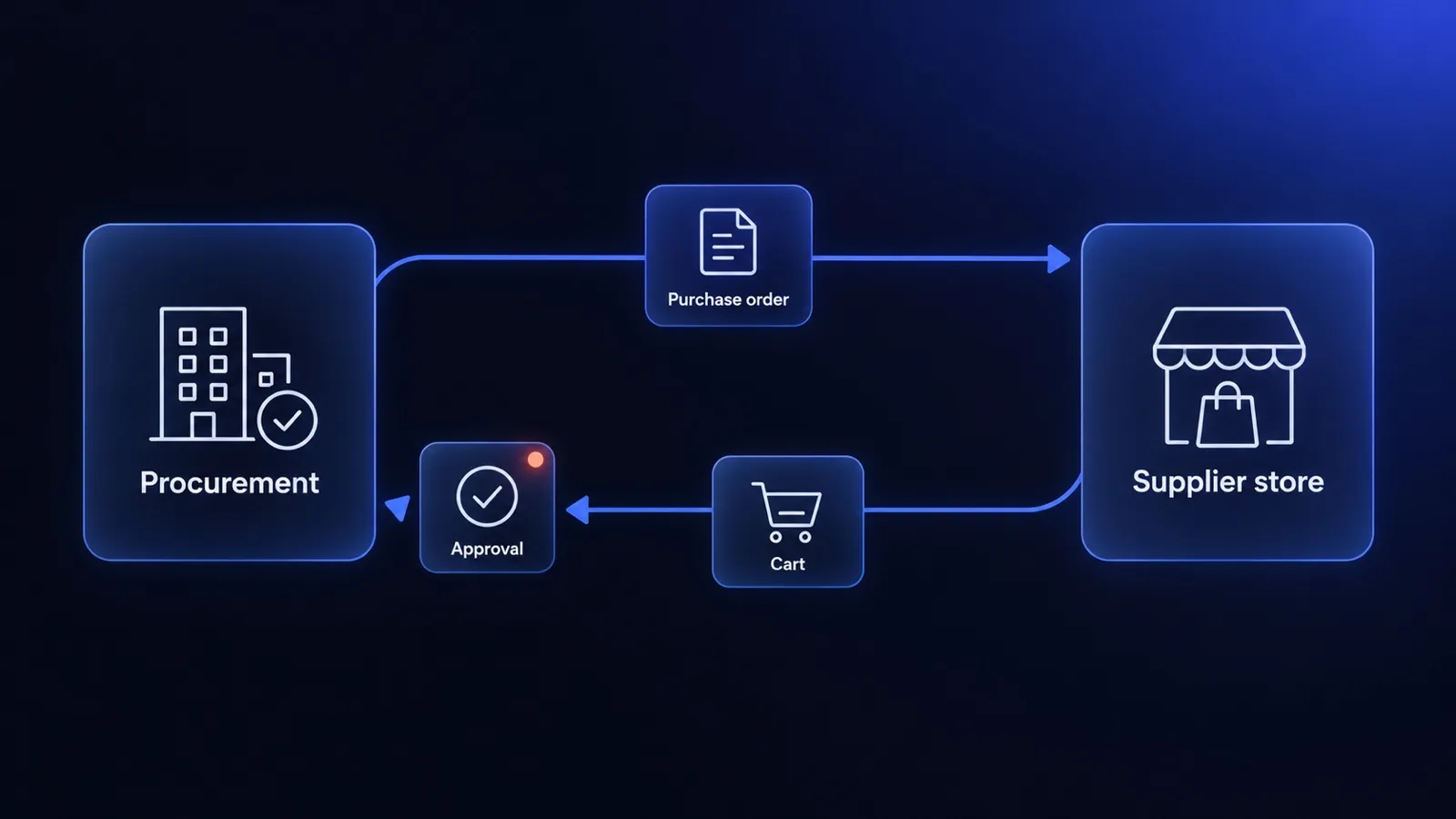
A punchout catalog is a supplier’s online store that a buyer opens from inside their company’s procurement system. The buyer clicks the supplier in their procurement software, lands in the supplier’s store already logged in as their company, sees the contract prices and assortment for that company, fills a cart and transfers it back. The cart becomes a requisition in the buyer’s system, goes through internal approval and comes back to the supplier as a purchase order.
Punchout exists because large companies want purchases to follow one process: budget, approvals, cost centres and an audit trail in one system. At the same time, the procurement team cannot maintain a full product catalog for every supplier. Punchout gives the buyer the supplier’s live catalog while the approval stays in the buyer’s system.
For a supplier, punchout is one more sales channel next to direct ordering. We described the direct channel, a logged-in portal where dealers order themselves, in our guide to a B2B customer portal.
How does a cXML punchout work, step by step?
A cXML punchout session runs in five steps, and the supplier’s store takes part in four of them. The names below are the cXML documents described in the cXML standard, the most common protocol in Ariba and Coupa.
- Setup request. The buyer clicks your catalog in their procurement system. The system sends a
PunchOutSetupRequestto your store with credentials that identify the customer, a session identifier (BuyerCookie) and the address to return the cart to (BrowserFormPost). - Setup response. Your store checks the credentials, opens a session for that customer and answers with a
PunchOutSetupResponsethat contains the start page URL. The buyer’s browser opens that page. - Shopping. The buyer browses and fills a cart in your store, at the prices and assortment of their company. Instead of a checkout, the store shows a button to transfer the cart.
- Cart return. Your store sends the cart back through the buyer’s browser as a
PunchOutOrderMessage: every line with your part number, description, quantity, unit of measure, price and, if required, a classification code such as UNSPSC. The cart becomes a requisition in the buyer’s system. - Purchase order. After internal approval, which may take minutes or days, the procurement system sends an
OrderRequestto your system. This is the binding order, and it must be matched to the session data and loaded into your ERP.
After the purchase order, cXML can carry the rest of the cycle: order confirmation, ship notice and invoice. Whether the customer expects those documents through the same channel is one of the first questions to ask.
cXML or OCI: which protocol will your customer ask for?
Your customer chooses the protocol, because it is defined by their procurement system. cXML is common in SAP Ariba, Coupa and Oracle procurement. OCI, SAP’s Open Catalog Interface, is common when the buyer purchases directly in SAP (SRM or S/4HANA).
| cXML punchout | OCI punchout | |
|---|---|---|
| Typical buyer systems | SAP Ariba, Coupa, Oracle, Jaggaer | SAP SRM, SAP S/4HANA |
| Session start | XML request with credentials, response with start URL | URL with login parameters and a return address (HOOK_URL) |
| Cart return | XML document posted through the buyer’s browser | HTML form with fields such as NEW_ITEM-DESCRIPTION[1], posted to HOOK_URL |
| Purchase order | OrderRequest in cXML |
Not part of OCI: a separate channel, for example email, EDI or cXML |
| Later documents | Confirmation, ship notice, invoice in cXML | Outside OCI |
OCI is simpler to start and harder to finish: the cart return is a short form, but the purchase order comes through a channel the customer chooses, and you still have to match it to the cart. A store that supports one protocol can add the second later, because both reuse the same customer session, contract prices and cart.
Punchout, B2B portal, static catalog or EDI: which one does the customer need?
Punchout is one of four ways to receive orders from a business customer, and each fits a different buyer. The question is not which channel is the most modern, but where the customer’s approval happens and who maintains the catalog.
| Channel | Where the buyer orders | Where the approval happens | What the supplier maintains | Fits when |
|---|---|---|---|---|
| B2B portal | In the supplier’s store | In the supplier’s store or none | Store, customer prices, accounts | Dealers, installers, smaller companies ordering directly |
| Punchout | Starts and ends in the buyer’s procurement system, shops in the supplier’s store | In the buyer’s procurement system | Store plus punchout session and purchase order intake | Large buyers with mandatory procurement software and a broad assortment |
| Static catalog | Entirely in the buyer’s procurement system | In the buyer’s procurement system | Catalog file per customer (for example CIF or BMEcat), refreshed when prices change | Short, stable assortment with fixed contract prices |
| EDI | In the buyer’s ERP, no browsing | In the buyer’s ERP | Message mapping between ERPs | Recurring orders for known items, high volume, no product search |
One store can serve several channels. A dealer orders directly in the portal, while a corporate customer punches out to the same catalog with the same prices. That is why we recommend building punchout on top of a B2B store with company accounts and customer prices, not as a separate catalog.
Some procurement systems also support so-called level 2 punchout: the buyer searches your products inside their system and punches out directly to a selected product page. It requires an index file of your products in the buyer’s system, so treat it as a later step, not the first version.
When is punchout worth building, and when is it the wrong choice?
Punchout is worth building when a named customer requires it and the orders from that customer justify the work. Requirements like this usually appear in a tender, a supplier onboarding or a contract renewal, and the customer says it directly: “we buy only through Ariba” or “we need an OCI catalog”.
Signs that punchout makes sense:
- A named customer asks for it and states the system and protocol.
- The customer buys a broad assortment from you repeatedly, so browsing your live catalog is useful to their employees.
- The customer has contract prices that you already keep per customer, or can keep.
- Losing the channel means losing the customer, because their policy does not allow purchases outside procurement software.
When punchout is the wrong choice
- No customer has asked for it. Punchout is not a marketing feature. Without a buyer who uses procurement software, nobody will open it.
- The customer buys a handful of fixed items. A static catalog file with contract prices is cheaper to maintain, and EDI fits recurring orders for known items better.
- The buyer is a dealer or a small company. They order directly, so a B2B portal with quick order and reorder serves them better.
- Your prices and stock in the store do not match the ERP. Punchout shows the buyer your store data at the moment of shopping. If that data is wrong, the requisition and the purchase order will be wrong too. Fix the data first.
What does the supplier have to build?
A supplier needs five things for one punchout customer, and only the first two are about the protocol. Most of the time goes into data and order matching, not into parsing XML.
- Session intake. An endpoint that receives the setup request, verifies credentials and opens a session tied to the customer’s company account. The session must not depend on the buyer’s normal login, because the buyer does not log in to your store.
- Customer catalog and prices. The buyer sees only the assortment and contract prices of their company. If your store already supports company accounts and customer price lists, this step is configuration. If not, it is the largest part of the project.
- Cart transfer instead of checkout. In a punchout session the store hides payment and delivery steps and shows a cart transfer button. The cart lines must use the units of measure, product codes and classification codes the customer expects.
- Purchase order intake. The purchase order arrives later, sometimes days after the session. Your system has to accept it, check it against prices and products, create the order and pass it to the ERP with the customer’s purchase order number. The order must be created once, even if the buyer’s system sends the same message twice.
- Tests with the customer. Procurement systems have test environments and supplier onboarding guides. Expect several test sessions and test orders before the customer’s procurement team switches the catalog on.
Also check the costs on the customer’s side of the network. SAP describes punchout catalogs as a feature of the SAP Business Network enterprise account for suppliers, which carries subscription and transaction fees, although some buyers cover these fees for their suppliers. Ask the customer before you plan the budget.
Order data from the purchase order flows into the invoice. If the customer also requires electronic invoices, the purchase order number and buyer references have to reach the ERP, as described in our guide to B2B e-invoicing. The general rule of one owner per data type, between the store and the ERP, is in our guide to ERP and ecommerce.
Example: building the OCI cart return in a Medusa store
Medusa has no punchout module out of the box. Punchout is built as custom API routes for the session and purchase order, plus a storefront mode that replaces checkout with a cart transfer. For OCI, the cart transfer is an HTML form with hidden fields that the browser posts to the HOOK_URL received at session start. A simplified mapping of cart lines to OCI fields:
type PunchoutLine = {
  sku: string
  title: string
  quantity: number
  unitPrice: number
  currency: string
  unitCode: string // unit code agreed with the buyer, for example "PCE"
}

function toOciFields(lines: PunchoutLine[]): Record<string, string> {
  const fields: Record<string, string> = {}
  lines.forEach((line, index) => {
    const n = index + 1
    fields[`NEW_ITEM-DESCRIPTION[${n}]`] = line.title.slice(0, 40)
    fields[`NEW_ITEM-VENDORMAT[${n}]`] = line.sku
    fields[`NEW_ITEM-QUANTITY[${n}]`] = String(line.quantity)
    fields[`NEW_ITEM-UNIT[${n}]`] = line.unitCode
    fields[`NEW_ITEM-PRICE[${n}]`] = line.unitPrice.toFixed(2)
    fields[`NEW_ITEM-CURRENCY[${n}]`] = line.currency
  })
  return fields
}
This is one mapping, not a complete OCI integration. The 40-character description limit comes from the OCI 4.0 specification; the customer may require further fields, such as material group or lead time. The session check, price validation and the separate purchase order channel still have to be built and tested against the customer’s system.
How to scope the first punchout project
Scope the first punchout project for one customer, one protocol and one ordering scenario, and ask the customer seven questions before you start.
- Which procurement system and which protocol? cXML or OCI, and which version.
- Level 1 or level 2? Does the buyer open the whole catalog, or search your items in their system first?
- Which assortment and which prices? The full catalog or a contract assortment, list prices or contract prices.
- Which codes on the cart lines? Units of measure, classification codes (for example UNSPSC), the customer’s own material numbers.
- How does the purchase order arrive? cXML
OrderRequest, EDI, email, or something else, and who confirms it. - Which documents after the order? Order confirmation, ship notice and invoice through the same channel, or by email.
- Who pays network fees, and when is the test environment available? This fixes the budget and the calendar.
If the store already has company accounts and customer prices, the punchout layer is a contained integration project. If the store does not exist yet, build a B2B store first: punchout customers and direct customers will use the same catalog, prices and order flow. We build B2B stores and portals on Medusa, connected to the ERP, as described on our B2B ecommerce development and ecommerce ERP integration pages. Company accounts for business buyers next to a retail store are shown in the ImpregnatyBC case study.
Sources
- cXML.org, the cXML standard, including the punchout feature. Reviewed on 30 October 2026.
- SAP, Open Catalog Interface (OCI) documentation and the OCI 4.0 specification. Reviewed on 30 October 2026.
- SAP, SAP Business Network supplier account pricing. Reviewed on 30 October 2026.
Frequently asked questions
What is a punchout catalog?
A punchout catalog is a supplier's online store opened from inside a buyer's procurement system, such as SAP Ariba, Coupa or SAP. The buyer browses the supplier's catalog at contract prices, fills a cart and transfers it back to the procurement system instead of checking out. The cart becomes a requisition, goes through the buyer's approval and returns to the supplier as a purchase order.
What is the difference between cXML and OCI punchout?
cXML is a protocol used by Ariba, Coupa, Oracle and others. It covers the punchout session, the cart return and the documents that follow, such as the purchase order, order confirmation and invoice. OCI is SAP's Open Catalog Interface. It covers only opening the catalog and returning the cart as form fields, so the purchase order reaches the supplier through a separate channel agreed with the customer.
Is a punchout catalog the same as a B2B portal?
No. In a B2B portal the buyer logs in to the supplier's site and places the order there. In punchout the buyer starts and finishes in their own procurement system, and the supplier's store only builds the cart. The same store can serve both: dealers order directly in the portal, while procurement-led customers punch out to it from their own software.
How long does it take to set up punchout for one customer?
The technical part for one customer and one protocol is usually a matter of weeks, if the store already supports company accounts and contract prices. The calendar is driven by the customer: access to their test environment, credentials, field mapping, test orders and sign-off by their procurement team. Ask for their supplier onboarding guide on day one, because it fixes most of the decisions.
Keep reading
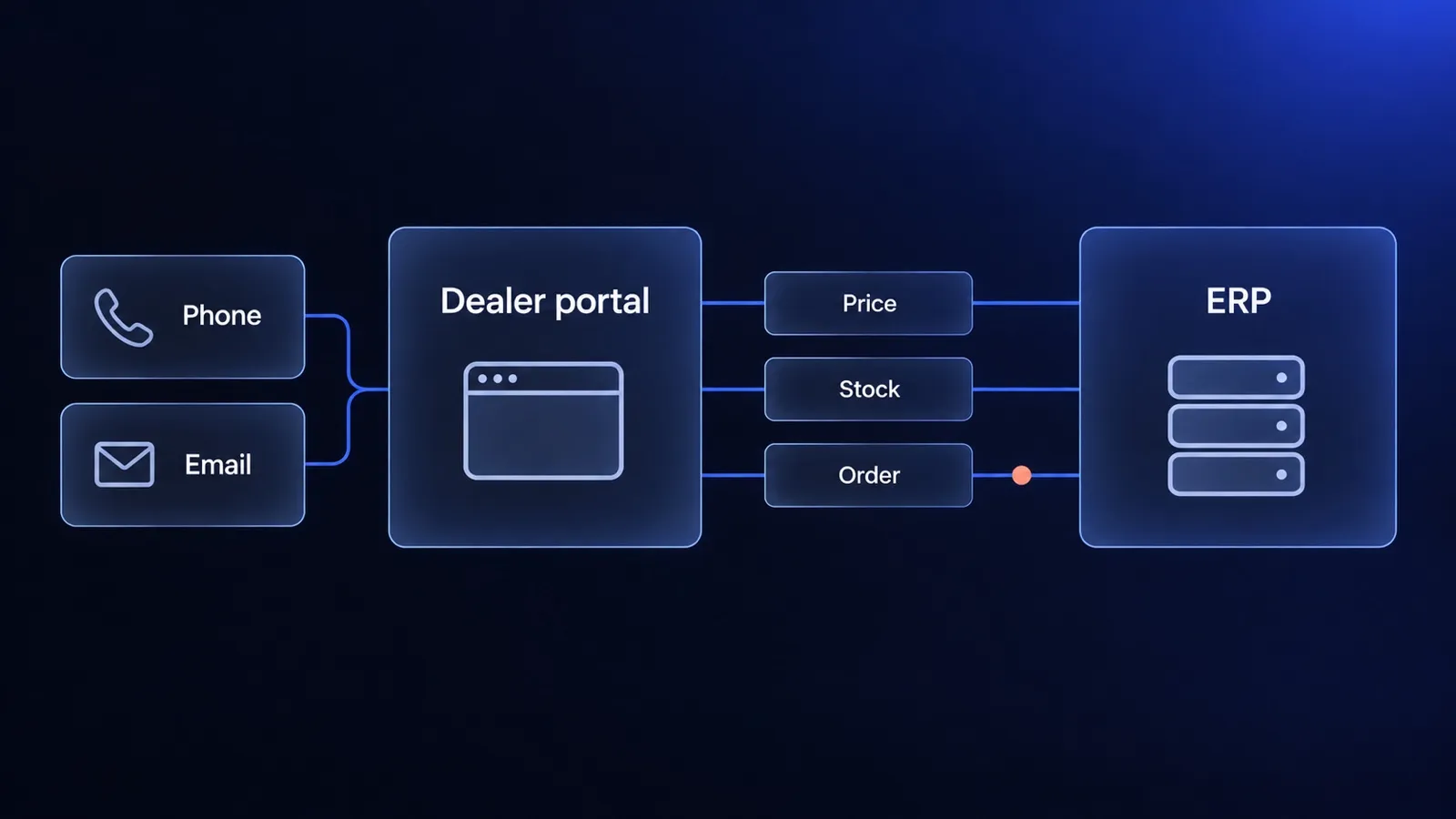
B2B customer portal for a dealer network: what to launch first and where the data comes from
B2B customer portal for a dealer network: the questions it must answer, the data the ERP owns, when punchout matters and how to launch in stages.
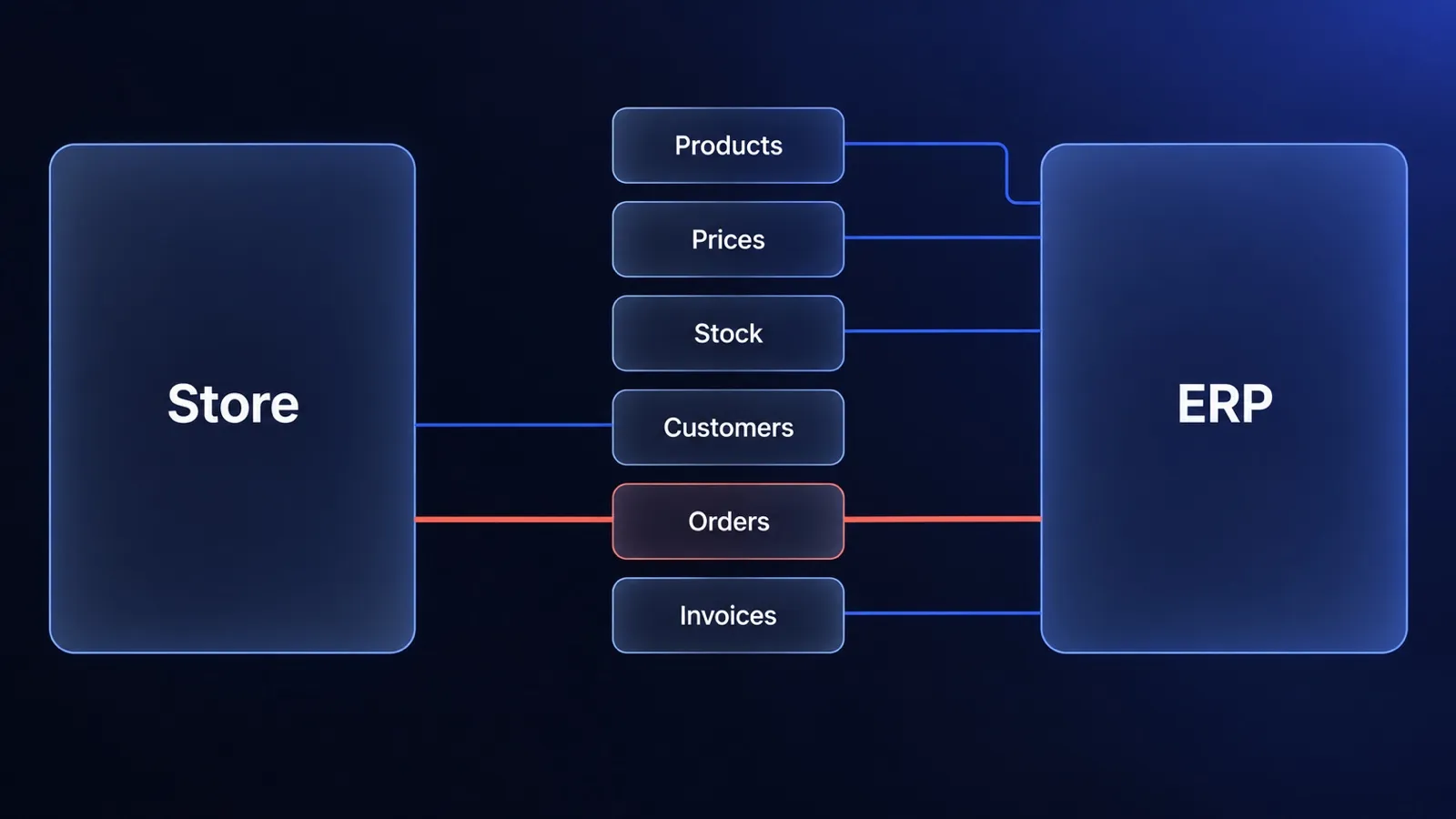
ERP and ecommerce: who owns which data, and how to connect the two
ERP ecommerce guide for decision makers: which system owns products, prices, stock and orders, three integration patterns, cost drivers and when to wait.
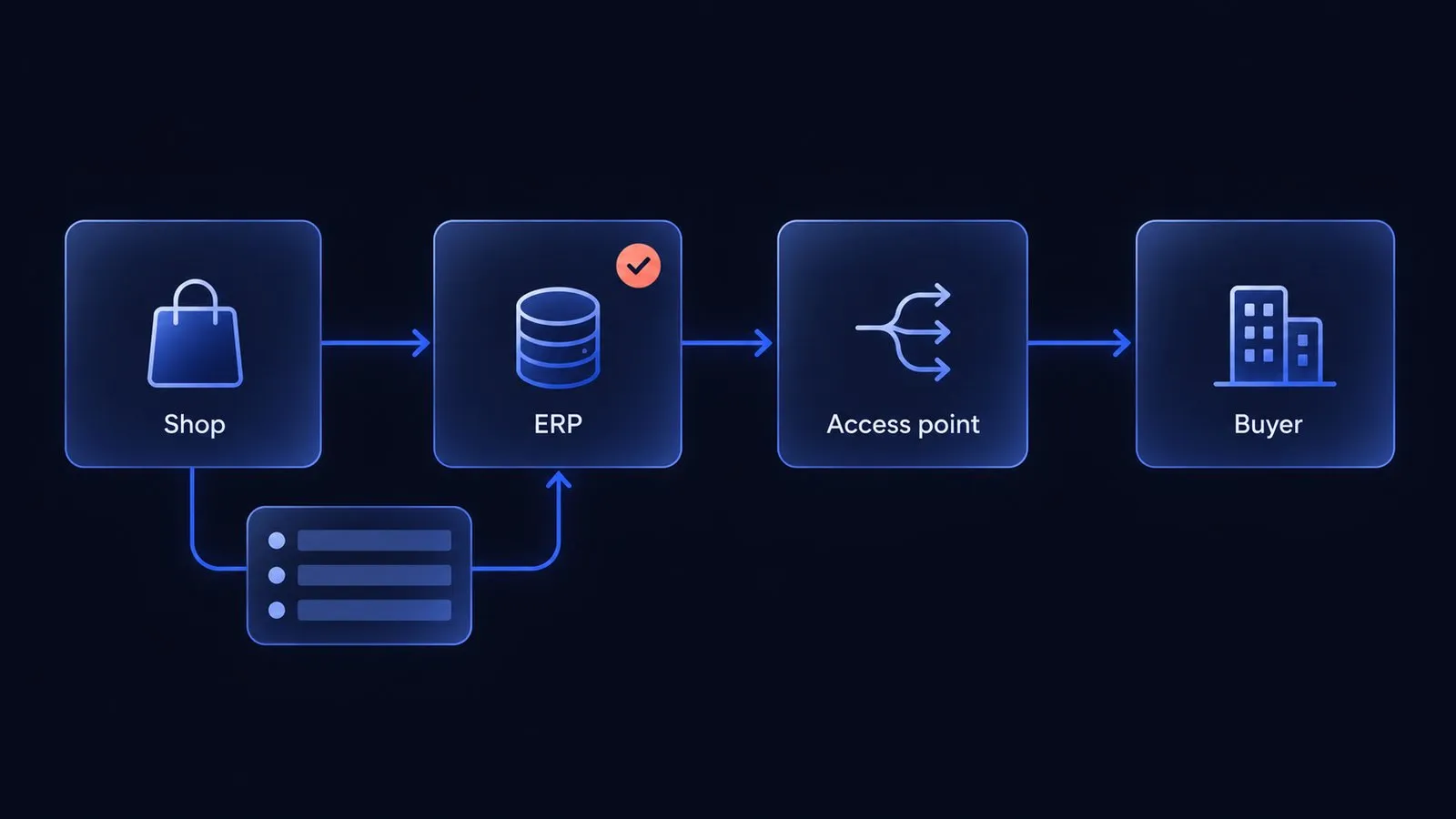
B2B e-invoicing: XRechnung, Factur-X and Peppol for online shops
B2B e-invoicing for online shops: who issues the invoice, which order data the shop must capture, and the 2026 to 2028 deadlines in Germany, France and Belgium.


Questions after reading?
Tell us what the article leaves open for your company. We reply within one working day and prepare a hypothesis before any call.
A question about the article Something does not match your situation, or you want to check an assumption behind a number.
Your own problem Describe the sales process and where your current platform stops being enough.
The next step You are weighing custom, off-the-shelf or a migration and want a second opinion before you commit.