
Leaving Magento: migrate to Shopify, Shopware or build custom?
Magento 2.4.6 lost regular support in August 2026, so many Magento stores now face an upgrade or a migration. This comparison shows where Shopify, Shopware and a custom build stop fitting a B2B store, and when staying on Magento is the cheaper answer.

Short answer
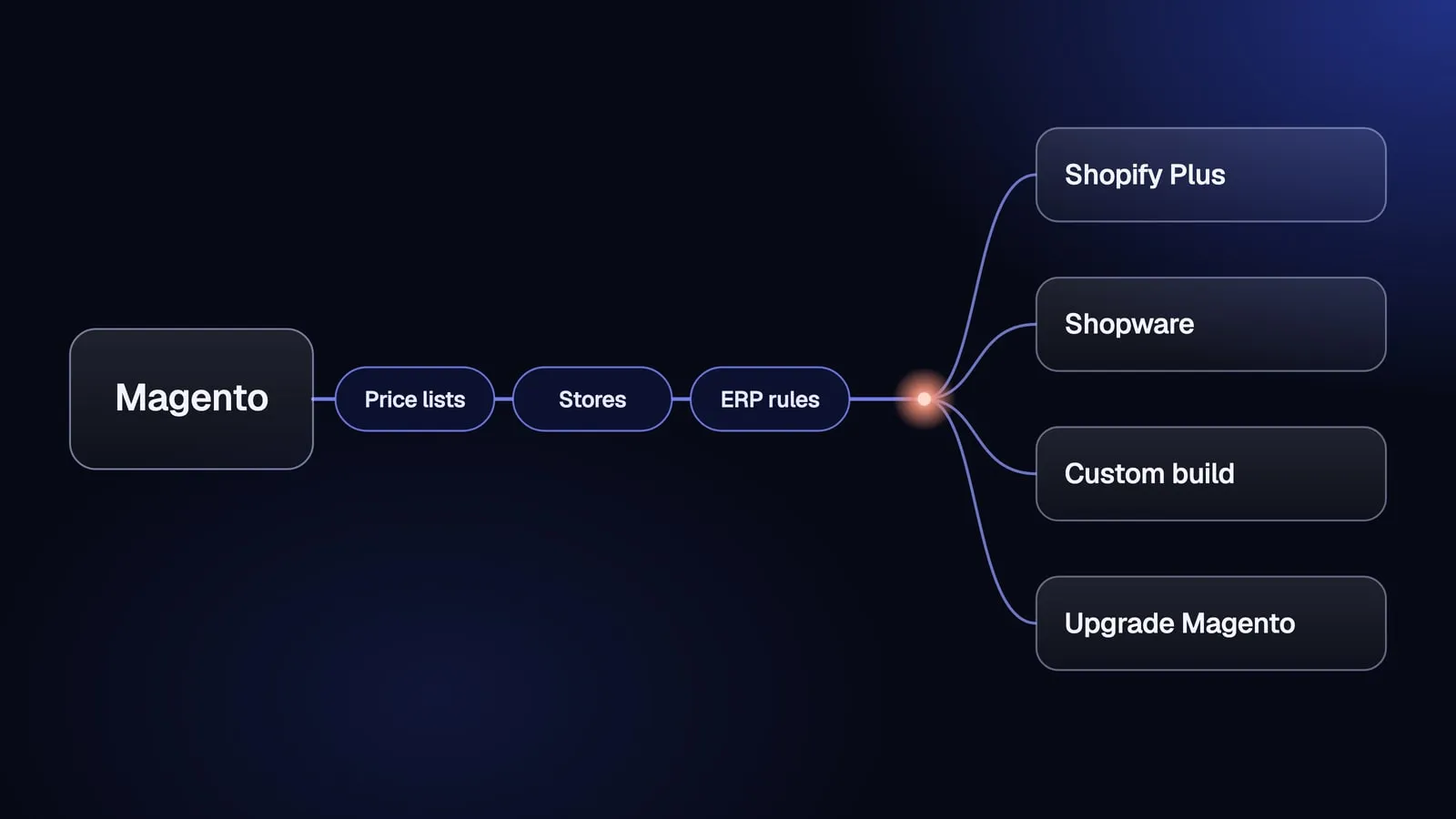
Leave Magento for Shopify Plus when your B2B price lists fit into Shopify’s catalogs and you run ten stores or fewer, because Shopify then takes hosting and upgrades off your team. Choose Shopware when you sell mainly in Europe, want an open platform an agency can extend, and can budget for the Evolve edition, where its B2B features live. Build custom, for example on Medusa, when per-customer prices, ERP rules or multi-store logic are how you win orders and every packaged option needs workarounds for them. If your only problem is that Magento 2.4.6 lost support in August 2026, upgrading to 2.4.8 is usually cheaper than any migration.
Do you need to leave Magento at all?
You do not need to leave Magento if the support deadline is your only problem and your extensions still cover how you sell. A Magento upgrade keeps your data model, your URLs and your team’s knowledge. A migration to another platform changes all three, so it has to buy something an upgrade cannot.
Adobe publishes support dates per release line on its released versions page:
| Release line | End of regular support |
|---|---|
| 2.4.6 | 11 August 2026 |
| 2.4.7 | 9 April 2027 |
| 2.4.8 | 11 April 2028 |
Magento 1 has had no support since June 2020. If you still run Magento 1, the move to any modern platform, Magento 2 included, is a rebuild, not an upgrade.
Is it a Magento upgrade or a platform migration?
A Magento upgrade moves your store to a newer release of the same platform, for example from 2.4.6 to 2.4.8, while a platform migration moves your data, URLs and integrations to different software. Many guides that rank for “magento migration” describe the first, or the older move from Magento 1 to Magento 2. This article is about the second: leaving Magento for Shopify, Shopware or a custom build.
An upgrade still costs work. Every extension and every custom module has to be tested against the new release, and the more business logic sits in extensions, the larger that test becomes. Count the extensions that carry pricing, checkout or ERP logic before you compare an upgrade with a migration.
What Magento really costs you today
The real cost of Magento is the sum of the licence, hosting, extension renewals and developer hours spent on every patch and upgrade. Adobe Commerce, the paid edition, is licensed in tiers based on gross merchandise value and average order value, and Adobe does not publish a price list. Magento Open Source has no licence fee, but it has the same upgrade and extension work.
If the Adobe Commerce licence is the only problem and you do not use its B2B module (company accounts, shared catalogs, negotiable quotes and requisition lists), moving to Magento Open Source can be the cheapest exit. When the problem is cost and complexity rather than the platform itself, the better project may be to simplify the store you already have.
Which three numbers decide where you go after Magento?
Three numbers from your own Magento store decide which target fits: the number of customer-specific price lists, the number of stores and store views, and the number of pricing and availability rules calculated outside the catalog. Feature lists do not separate Shopify, Shopware and a custom build for a B2B company. These three numbers do, because each target has a limit or a cost step at a different point.
- Customer price lists. Count customer groups, shared catalogs on Adobe Commerce, and any per-customer prices set by an extension or imported from the ERP. One price list per key account is a different problem from three tiers for all customers.
- Stores and store views. Count websites, stores and store views in Magento, plus currencies and languages. Magento lets one installation run many of them. Not every target does that in one subscription.
- Rules calculated outside the catalog. Count volume discounts, contract prices, credit limits, stock per warehouse and approval rules that your ERP or a Magento extension calculates at order time. Each of them becomes an app, a configuration or custom code on the new platform.
Where these rules live matters as much as how many there are. If the ERP owns prices and stock, the store only shows them, and the work on the new platform is an ERP integration, not a data migration. Our guide to ERP and ecommerce explains how to split that ownership. If you are not sure your ERP and store agree today, check where your ERP and store disagree before you choose a target.
Magento vs Shopify Plus vs Shopware vs custom: how do they compare?
Magento, Shopify Plus, Shopware and a custom build differ most in who carries hosting and upgrades, how B2B price lists are modelled, and how licence costs grow with your business. The table compares them on the points that decide a B2B migration. Prices are the published starting points, checked on the date shown.
| Stay on Magento | Shopify Plus | Shopware | Custom build (e.g. Medusa) | |
|---|---|---|---|---|
| Licence or subscription | Open Source: none. Adobe Commerce: tiered by GMV and AOV, not published | From $2,300 a month (source, as of 2026-10) on a three-year term | Rise from €600 a month (source, as of 2026-10), Evolve from €2,400 a month (source, as of 2026-10), Beyond on request | No licence for the open-source core, you pay for the build, hosting and maintenance |
| B2B price lists | Customer groups; shared catalogs on Adobe Commerce | Up to three catalogs below Plus, unlimited and company-specific on Plus | B2B Components in Evolve and Beyond | Modelled to your rules, for example price lists per customer group |
| Stores | Many on one installation | Ten stores in the Plus fee | Several sales channels in one installation | As many as you build |
| Hosting and upgrades | Your team or agency | Shopify | Cloud or self-hosted, depending on edition | Your team or partner |
| Who owns the code | You | Shopify owns the platform, you own the theme and apps you build | You own extensions, the platform is licensed | You own the store’s code |
| Typical reason to choose | Extensions still fit, the deadline is the only problem | Your process fits Shopify’s model | EU market, agency ecosystem, open platform | Pricing and ERP logic are how you win orders |
The custom column has no single price because the scope is your rules. Our own entry offer is in the section on custom builds below. For a broader method of scoring platforms against your requirements, read how to choose an ecommerce platform.
When is Shopify or Shopify Plus the right move after Magento?
Shopify Plus is the right move when your price lists fit into Shopify’s B2B catalogs, you run ten stores or fewer, and you want to stop paying for hosting and upgrades. Shopify Plus costs $2,300 a month on a three-year term or $2,500 a month on a one-year term (source, as of 2026-10), and the flat fee covers the main store and nine expansion stores. Shopify’s EU pricing page lists each additional store at €250 a month (source, as of 2026-10).
B2B on Shopify no longer requires Plus. Shopify’s B2B plan comparison lists company profiles, catalogs, volume pricing and payment terms on Basic, Grow and Advanced, with up to three active catalogs. Plus adds unlimited catalogs, catalogs assigned to specific companies, and deposits or partial payments. Magento customer groups and shared catalogs map onto Shopify catalogs, so the count from the previous section tells you which plan you need.
The flat fee is not the whole cost. Shopify also has a variable, revenue-based platform fee for some higher-volume businesses, and it does not publish the rate. Our guide to Shopify Plus pricing lists every cost line a B2B company pays.
When is Shopify the wrong choice?
Shopify is the wrong choice after Magento when your B2B pricing needs more than its catalogs can hold or needs logic Shopify does not calculate. Five signals point that way:
- You keep more negotiated price lists than the catalogs on your target plan allow, or you need company-specific catalogs without paying for Plus.
- Your ERP calculates prices, discounts or credit limits at order time, and each calculation would need an app or custom code on Shopify.
- You run more than ten stores, or store views that differ in catalog, not only in language.
- The apps you would need to replace Magento extensions add a monthly cost that grows with every new rule.
- You want to own the code of your store and your checkout.
If you recognise two or more of these signals, compare 24 months of Shopify with the other two options before you sign. Our method for deciding when Shopify stops paying off works for any platform.
When is Shopware the right move after Magento?
Shopware is the right move when you sell mainly in Europe, want an open platform that an agency can extend, and can budget for an edition that includes B2B. Shopware’s B2B Components, such as company accounts and quote management, are part of the Evolve and Beyond editions, according to Shopware’s B2B Components documentation. Evolve starts at €2,400 a month (source, as of 2026-10), and Rise, without the B2B Components, starts at €600 a month (source, as of 2026-10).
Shopware works on a model familiar to Magento teams: an open-source core, a marketplace of extensions and a network of agencies, strongest in German-speaking markets. Check the Shopware version as carefully as the edition. Shopware 5 reached end of life at the end of July 2024, and Shopware 5 plugins do not work on Shopware 6, so any project starts on Shopware 6.
When is Shopware the wrong choice?
Shopware is the wrong choice when you need B2B features but plan for the Rise edition, because company accounts and quotes are not part of it. It is also a weak fit when no Shopware agency works in your market, or when you are leaving Magento precisely because extensions and upgrades cost too much: Shopware keeps that same model.
When is a custom build the right move after Magento?
A custom build is the right move when customer-specific prices, ERP rules or multi-store logic are how you win orders, and every packaged platform needs workarounds for them. In that case the workarounds are the product, and paying a subscription to work around a platform costs more over time than owning the store that does what you sell.
Medusa is one way to build a custom store without starting from zero. Its core is open source, and its B2B recipe shows how price lists can be limited to customer groups and how companies and their employees can be modelled. The ERP can stay the source of truth for prices and stock, with the store reading them through an integration. Our page on building on Medusa compares Medusa with Magento, PrestaShop and Sylius.
A custom build has no licence that grows with revenue, but it is not free to run: you pay for hosting, maintenance and every change.
When is a custom build the wrong choice?
A custom build is the wrong choice when your catalog and pricing are standard, when nobody in your company owns the product after launch, or when there is no budget to develop the store after go-live. It is also the wrong choice when an upgrade to Magento 2.4.8 removes the blocker. In those cases, a packaged platform or an upgrade costs less and carries less risk.
When the custom route fits, our Magento and Adobe Commerce migration work starts with the inventory from this article, not with a platform pitch. A new store on our foundation launches in 30 days from €10,000 net, and moving data, redirects and integrations from Magento is scoped and quoted separately at a fixed price after an audit. Hosting and maintenance start from €100 net a month.
What moves from Magento, and what do you rebuild?
Data moves from Magento, but logic has to be rebuilt. The catalog with attributes and variants, customers and customer groups, order history and the full list of URLs move as data, through exports, scripts and a redirect map. Extensions, custom modules, pricing rules and the Adobe Commerce B2B module (company accounts, shared catalogs, negotiable quotes, requisition lists and purchase order approvals) have to be rebuilt or replaced on the new platform.
Customer passwords need a decision in the plan. Magento stores only password hashes, so a password moves only if the new platform can check Magento’s hash format at the first login and then re-hash it. Shopify does not import them: migration tools such as Cart2Cart move customer data, not login credentials. In a custom build you own the login code, so a legacy check can be part of the scope. Where passwords cannot move, plan an account activation email and tell B2B buyers before launch day.
The order of work for the move itself, from inventory to the first 30 days after launch, is in our step-by-step migration checklist.
How do you decide where to go after Magento in one afternoon?
You can make a first decision about leaving Magento in one afternoon with five steps and the data you already have:
- Count the three numbers: customer price lists, stores and store views, and rules calculated by your ERP or extensions.
- Check your release line against Adobe’s support dates, so you know how much time you have.
- Put the numbers next to the limits in the comparison table: three catalogs below Shopify Plus, ten stores in the Plus fee, B2B in Shopware Evolve.
- Price 24 months for the two options that remain, with the same scope for each. Our guide to what an ecommerce website costs shows which lines to include.
- Check where your ERP and store disagree, because every mismatch you find now is scope for the migration, whichever target you choose.
If the numbers fit Shopify or Shopware, choose the platform and keep the inventory for the migration. If they fit nowhere without workarounds, a custom build deserves a quote. If the deadline was the only problem, upgrade Magento and run the same check again in a year.
Frequently asked questions
Is Magento still supported in 2026?
Yes, but only on recent release lines. Adobe's released versions page lists the end of regular support for 2.4.6 on 11 August 2026, for 2.4.7 on 9 April 2027 and for 2.4.8 on 11 April 2028. Magento 1 has had no support since June 2020. If you run 2.4.6 or older, you either upgrade within Magento or plan a migration, and the cheaper path depends on how much logic sits in extensions.
Can Shopify handle customer-specific B2B pricing from Magento?
Partly. Shopify's B2B features run on Basic, Grow and Advanced with up to three active B2B catalogs, while Plus allows unlimited catalogs and catalogs assigned to specific companies. If every key account has its own negotiated price list, count those lists first. When they exceed what catalogs can hold, you need Plus, an app, or a platform that models customer prices directly.
Is Shopware a good alternative to Magento for B2B?
It can be, if you budget for the right edition. Shopware's B2B Components, including company accounts and quote management, are part of the Evolve and Beyond editions, not Rise. Shopware suits European companies that want an open platform and an agency to extend it, but it keeps the same model of extensions and upgrades that many companies leave Magento to escape.
How much does it cost to migrate from Magento?
There is no honest standard figure, because the price depends on how many extensions carry business logic, how many integrations you run and how many URLs need redirects. Ask every vendor to quote against the same inventory of extensions, price lists, stores and integrations, and compare the total cost over 24 months, not the build price alone. A quote without that inventory is a guess.
When should I stay on Magento?
Stay when your team knows Magento, your extensions still cover what you sell and the main problem is the support deadline. Upgrading from 2.4.6 to 2.4.8 keeps your data model and your URLs. On Adobe Commerce, moving to Magento Open Source can remove the licence if you do not use the B2B module. Migrate when maintenance grows faster than sales or every change needs a workaround.
Keep reading
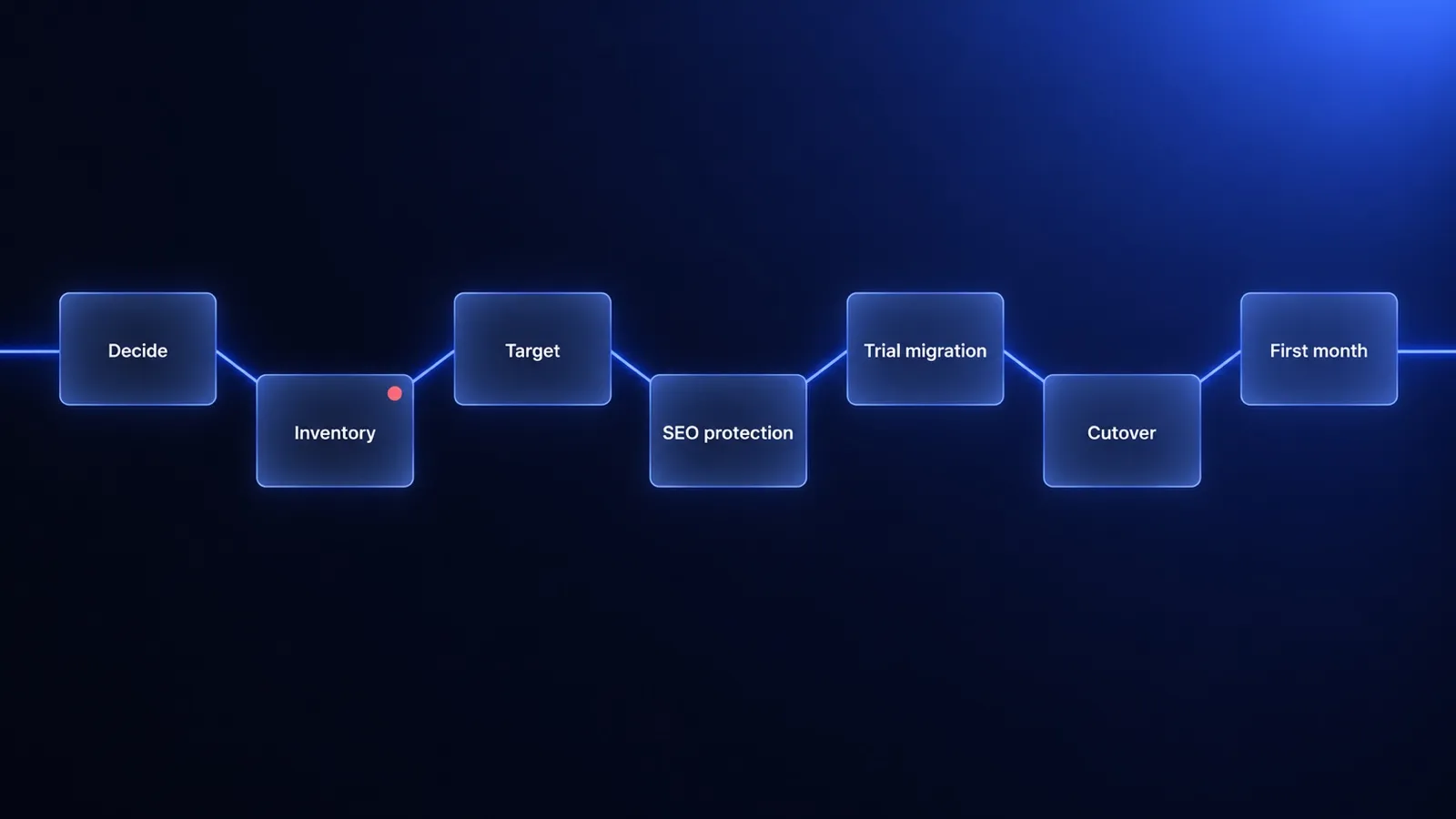
Ecommerce platform migration: a step-by-step checklist for B2B companies
Ecommerce platform migration in seven gates: what to inventory before you choose a target, how to protect SEO with a redirect map, and when to stay put.
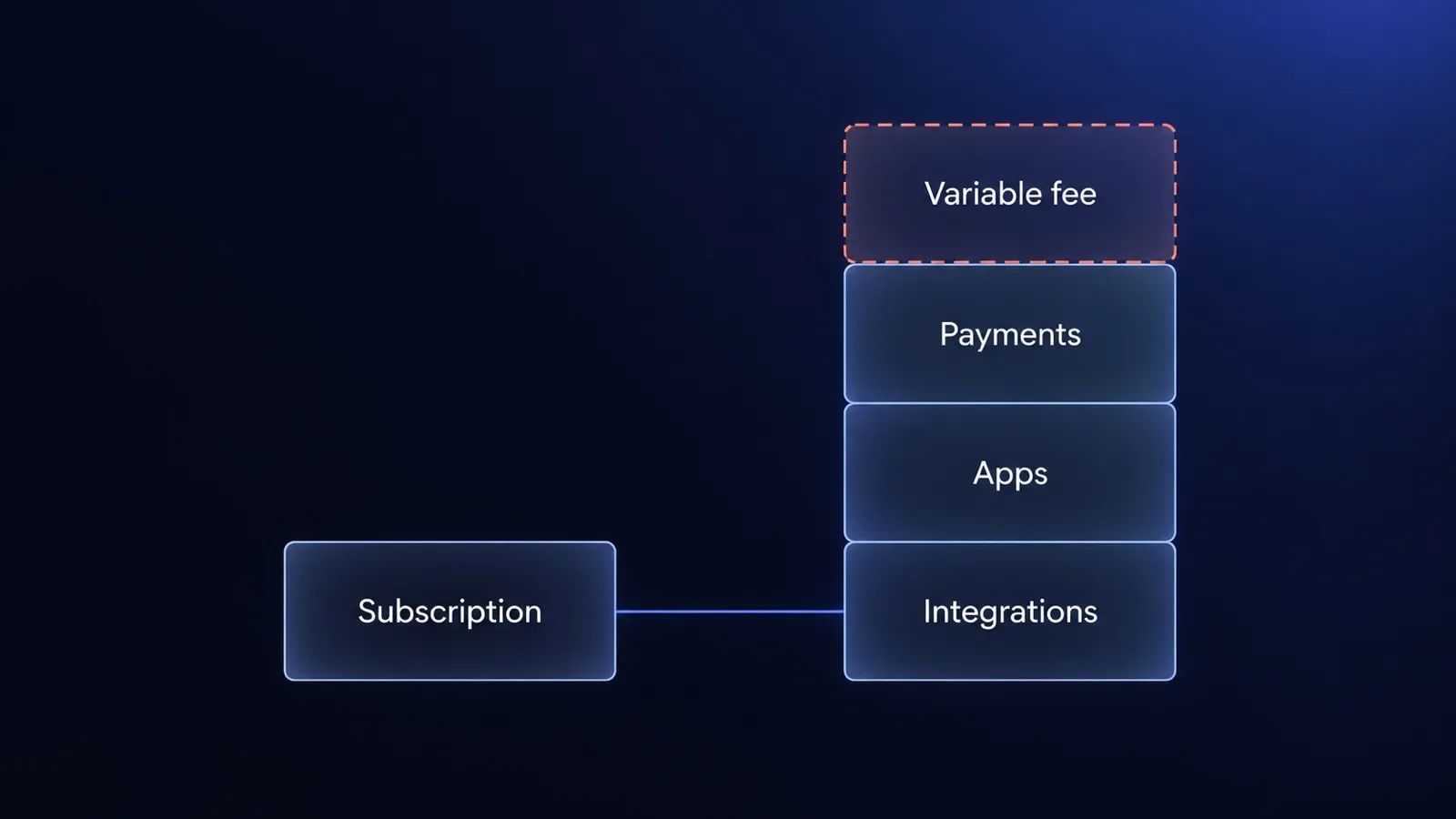
Shopify Plus pricing in 2026: the real total cost for B2B
Shopify Plus pricing starts at $2,300 a month. For B2B, the real cost sits in the variable fee, payments, apps and integrations. What to count before you sign.
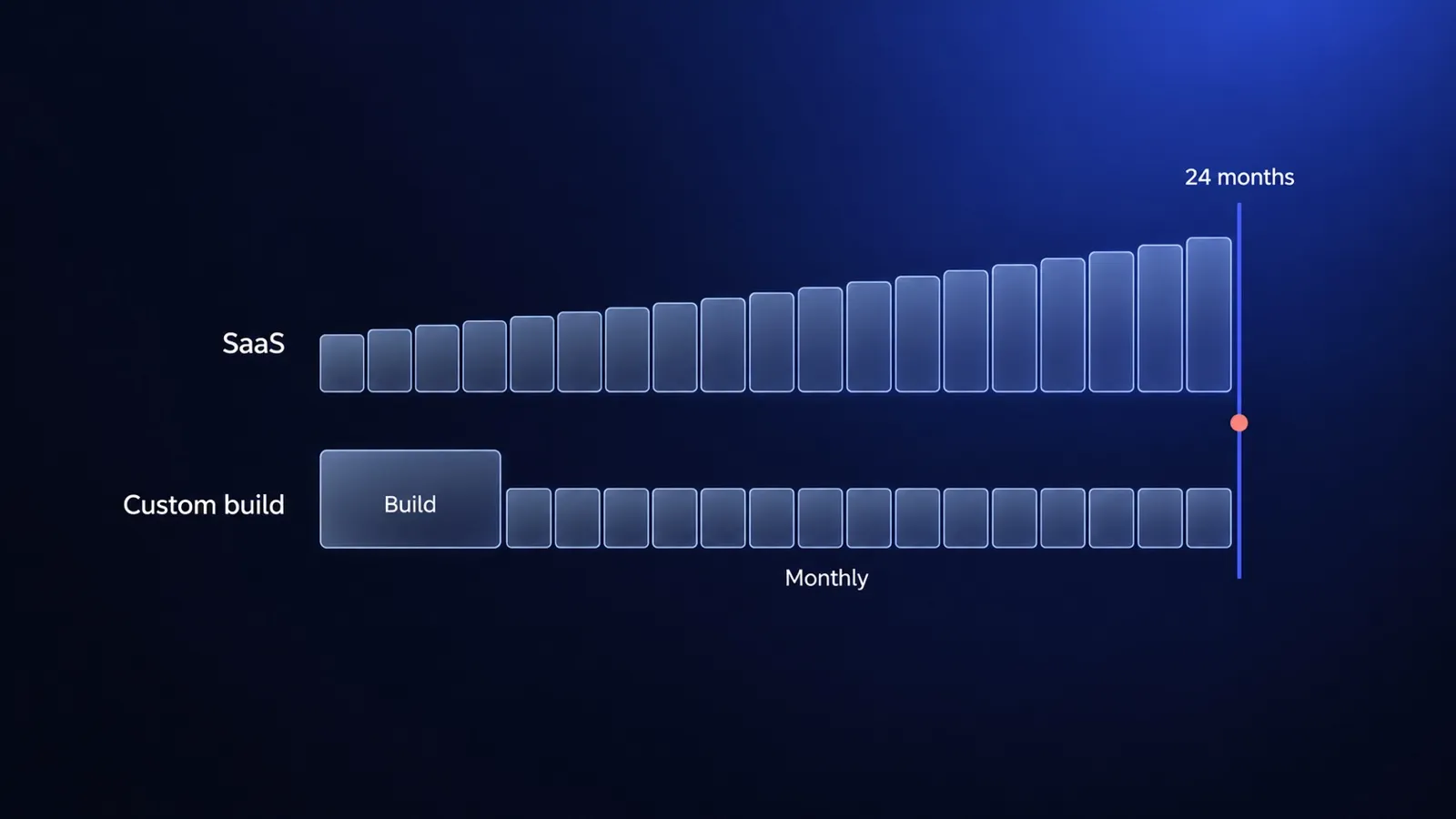
Ecommerce website cost in 2026: SaaS vs custom build, with real numbers
Ecommerce website cost in 2026, using published prices only: Shopify, BigCommerce and a custom build on Medusa compared over 24 months on the same scope.


Questions after reading?
Tell us what the article leaves open for your company. We reply within one working day and prepare a hypothesis before any call.
A question about the article Something does not match your situation, or you want to check an assumption behind a number.
Your own problem Describe the sales process and where your current platform stops being enough.
The next step You are weighing custom, off-the-shelf or a migration and want a second opinion before you commit.